Job costing for fix-and-flip crews
Know what every house costs you. Every day.
CostTally turns clock-ins, receipts and lender draws into one number per job, by category, the same day the money moves. Built on real houses with a California flipper, for crews that work in English and Spanish, with or without signal.
30 days of Pro on us. No card. One active job stays free forever.
- Clock-in checked against the jobsite geofence
- Receipts read by AI and split to the cent
- Overtime and day rates computed per shift
- Works without signal, syncs when it returns
- English and Spanish, chosen per person
Why it exists
The spreadsheet is always a week behind.
A flip is a race against holding costs. You find out you went over on drywall when the invoice comes, two weeks after the hours were worked. The foreman texts a photo of a receipt. Somebody’s Friday pay gets figured on a napkin.
CostTally captures each of those moments where it happens, on the phone of the person doing it, and puts the dollar on the right house and the right category before you sit down that night. Not a bookkeeping system. A running total you can act on.
What a late number costs
Hard money charges by the day. Slide to your loan.
- Interest alone, every day the house is yours
- $115
- The price of not knowing for 14 days
- $1,611
- A month the job runs long
- $3,452
Interest only. Taxes, insurance and utilities are on top. CostTally is a record-keeping tool, not financial advice.
On site
A clock-in that takes ten seconds and holds up later
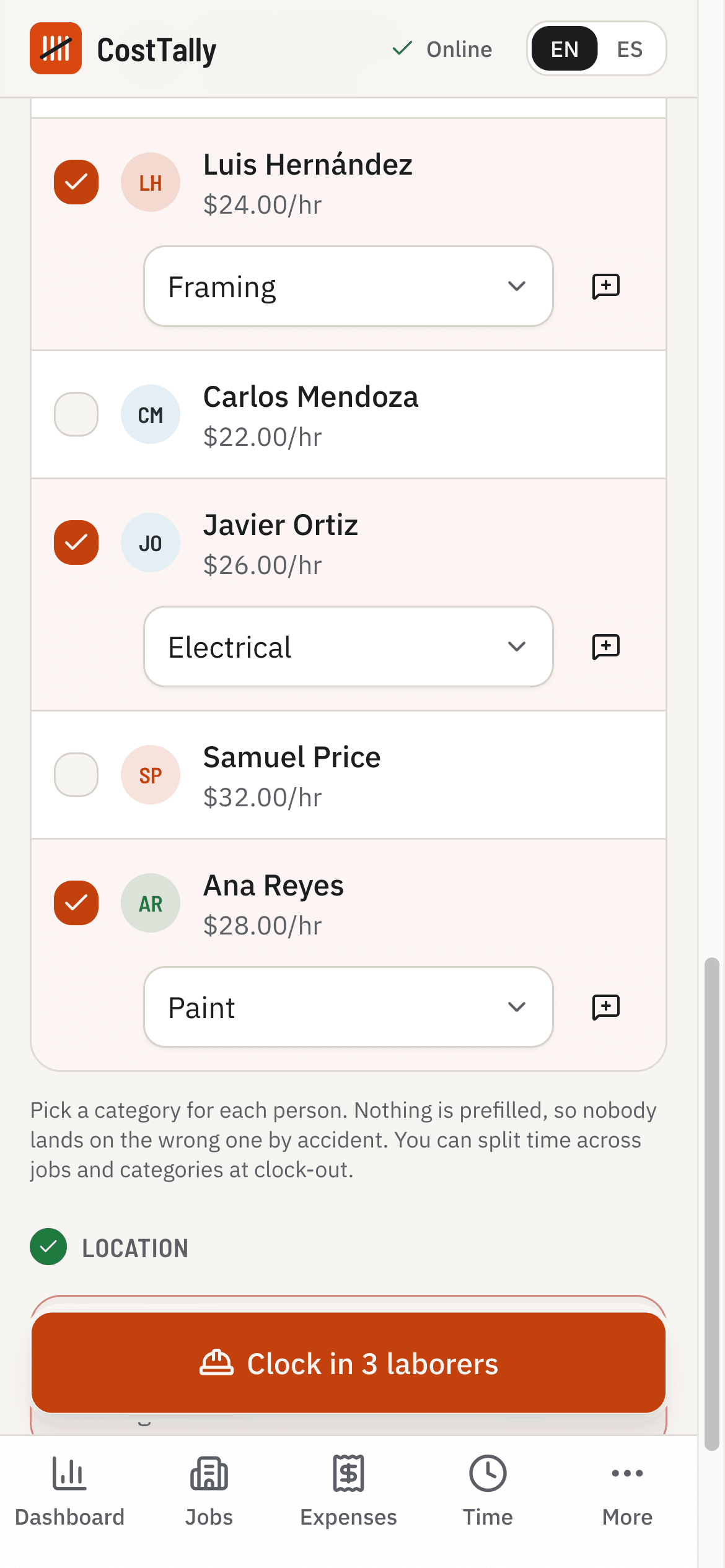
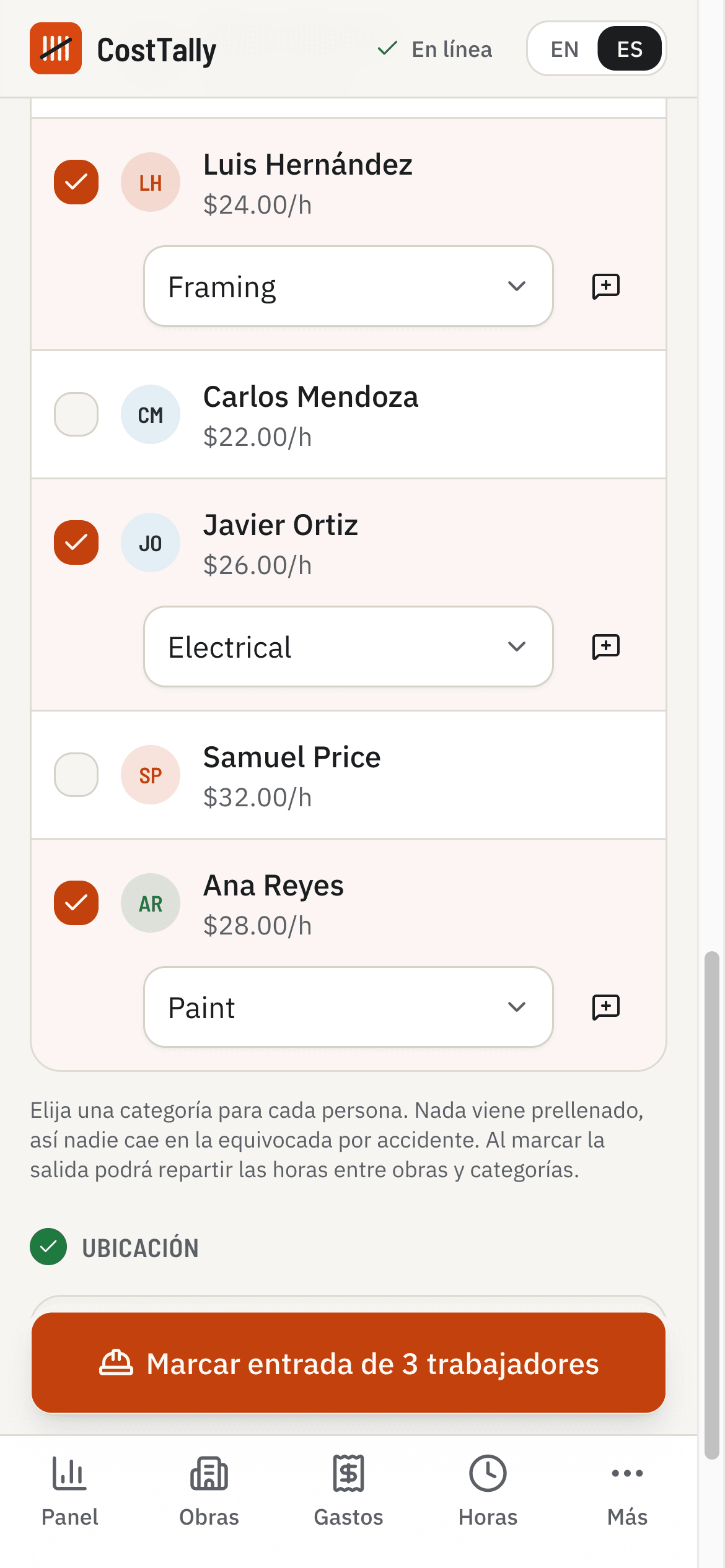
The foreman opens the app, says the names or taps them, picks the category, and the crew is in. When the phone shares its location, the app records it and how far it was from the site. The category is never prefilled, so nobody lands on the wrong one by habit. At the end of the day, clock the whole crew out at once and split the time across jobs if they moved.
- Voice crew pick in English or Spanish, on phones with speech support
- Geofence check with the distance shown, whenever the phone shares its location
- Kiosk mode for a shared tablet
- Shifts that run past the cap close themselves and ask for review
In the truck
Snap the receipt. It lands on the right job.
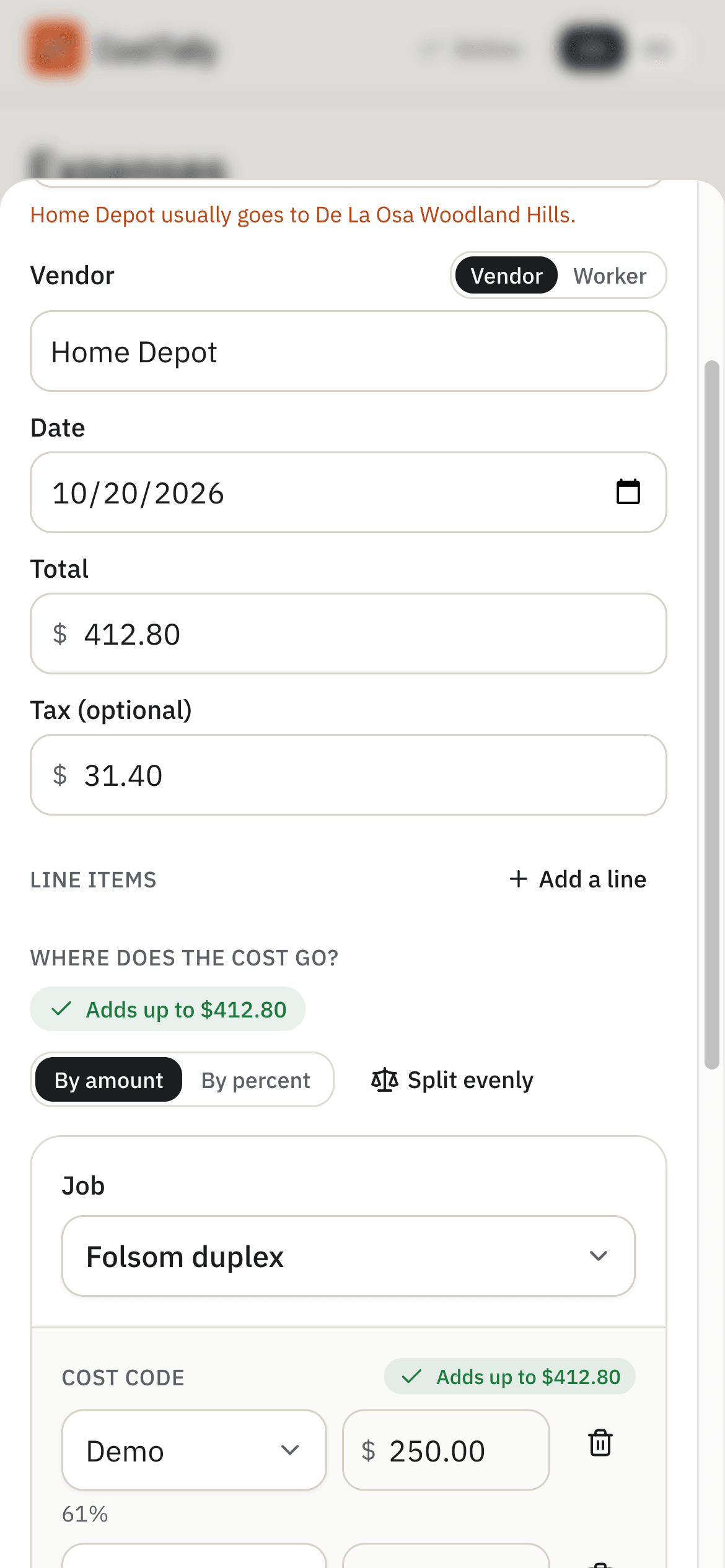
Point the camera at the receipt and the vendor, date, total and line items come back filled in. The job and split it usually goes to are suggested from what you did last time. Split an invoice across categories in exact dollars. Import a month of card charges at once and match them to receipts you already have.
- Receipt photo read by AI, reviewed by you
- Dollar or percent splits across categories and jobs
- Card statement import with duplicate detection
- A foreman's purchase waits for approval; the owner's lands approved
At the desk
The number you actually run the business on
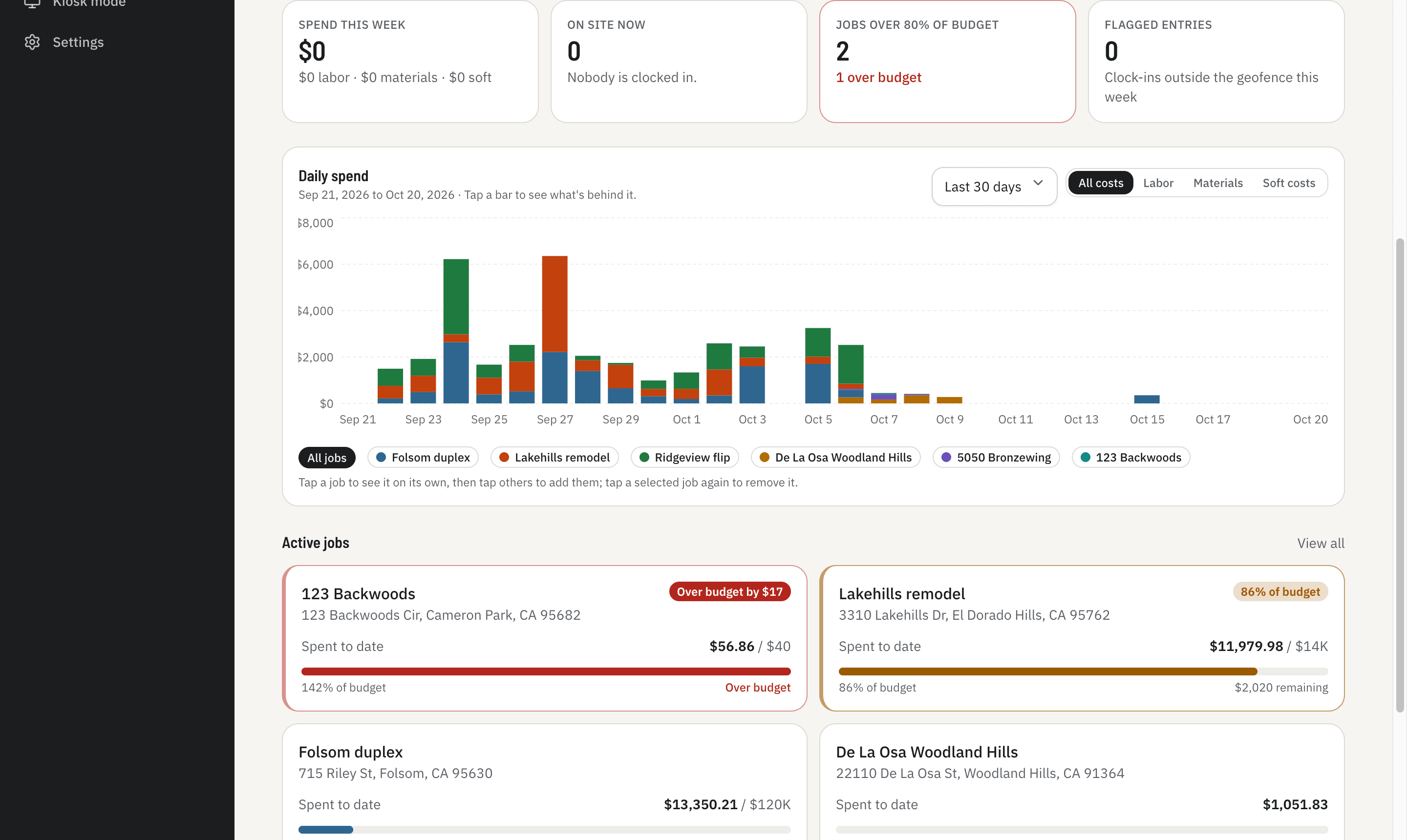
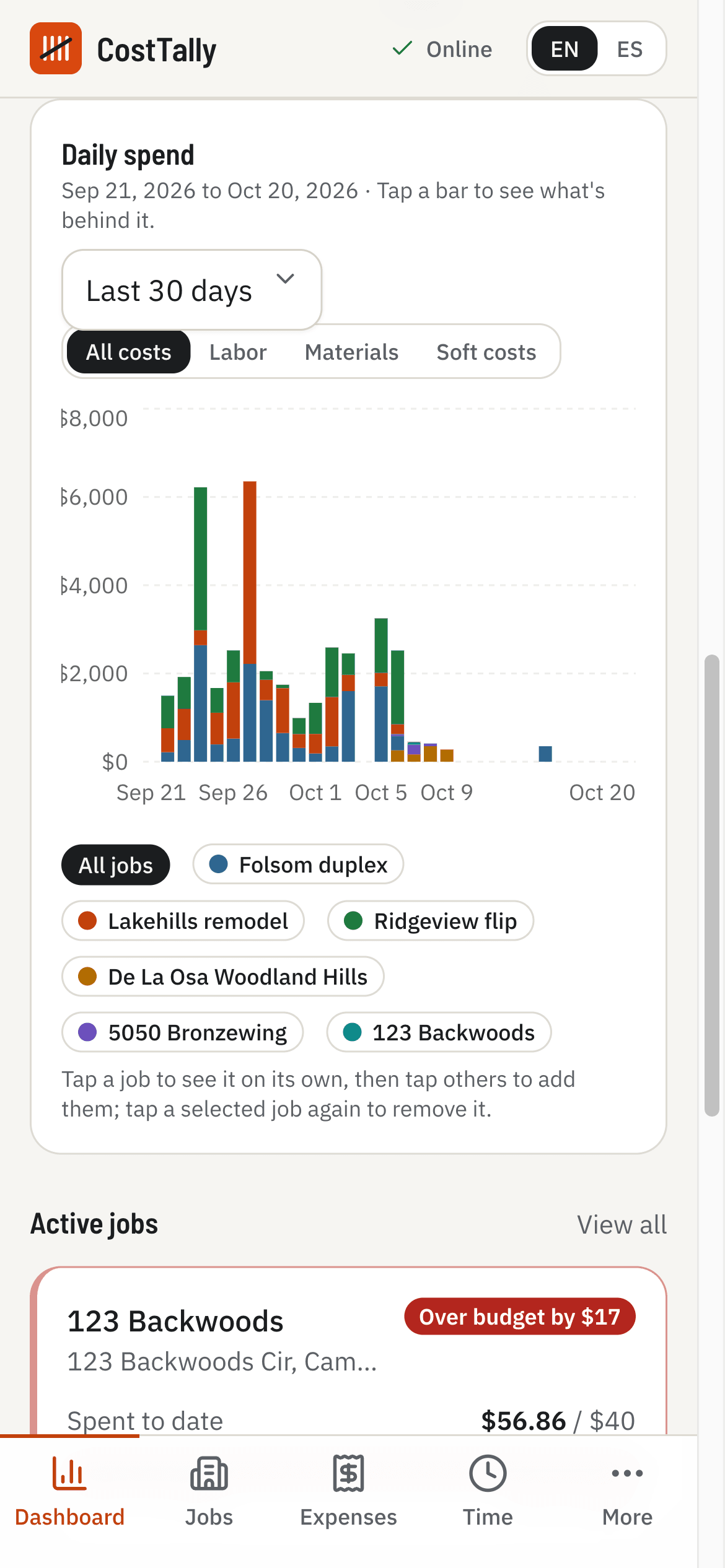
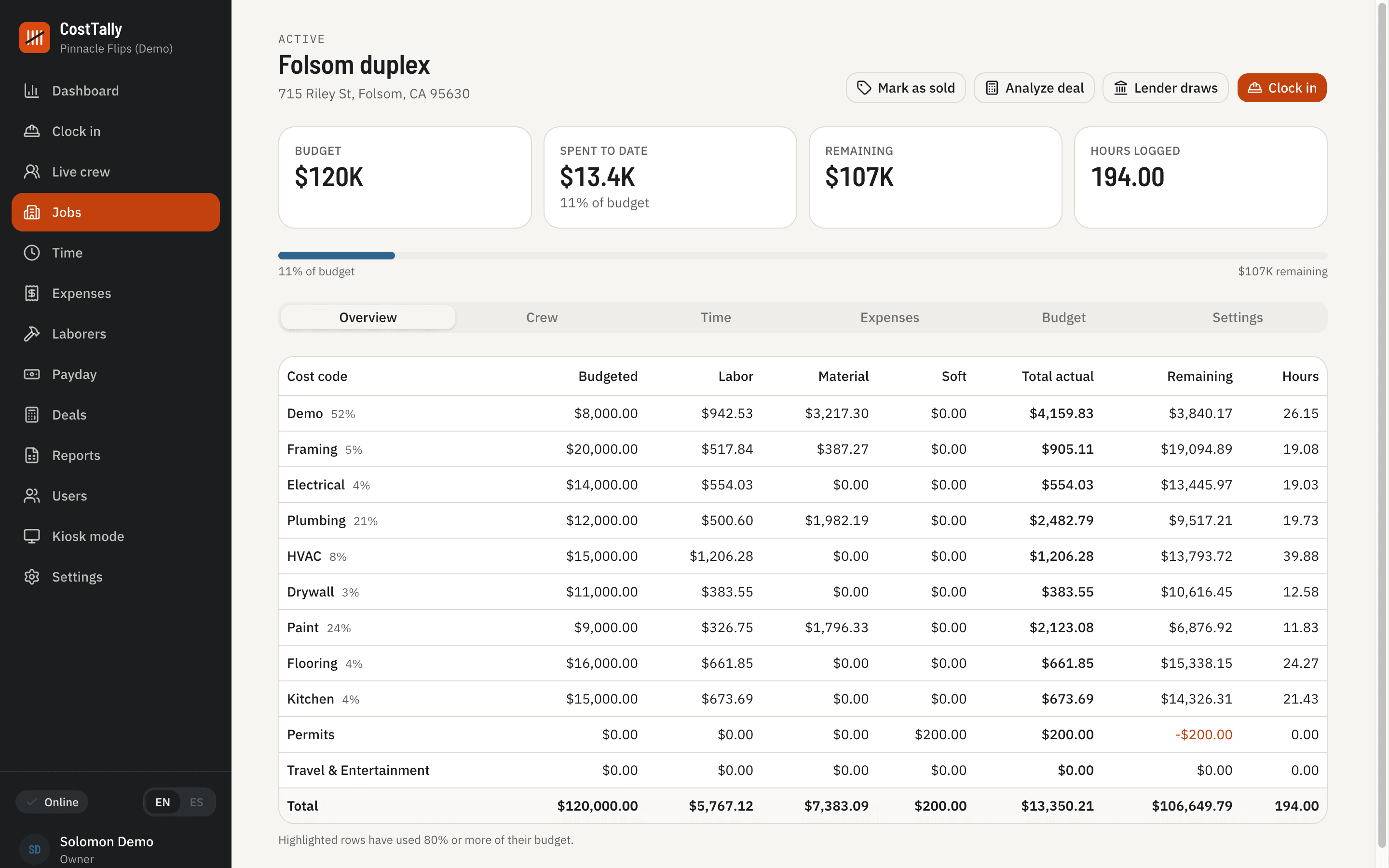
Every job shows labor, materials and soft costs against each category's budget, with the hours behind the labor. The dashboard stacks the last fourteen days by job, or any span you pick, and one toggle shows labor, materials or soft costs alone. Tap a bar to see the shifts and receipts behind it.
- Budget lines by category, highlighted at 80 percent
- Labor, materials and soft costs, together or apart
- Drill from a bar to the receipt in two taps
- Lender draws reconciled against real spend
Hecho para cuadrillas
The foreman works in Spanish. You read it in English.
Language is chosen per person, not per company. The foreman runs clock-in, receipts and clock-out in Spanish on his phone. The same shifts show up on your dashboard in English a second later. Voice crew pick understands both.
El mayordomo marca la entrada, toma la foto del recibo y cierra el día en español. Usted lo ve en inglés. Mismos datos, mismo momento.
- Every screen, every alert, every email in both languages
- Switch with one tap; the choice follows the person to any phone
- Names, categories and dollars never get translated, so nothing drifts
Everything in the box
Built for the way a flip actually runs
Geofenced clock-in
The foreman picks the crew, by tap or by voice, and the app records where the phone stood. Clock-ins away from the site are flagged, not hidden.
Kiosk mode
A shared phone or tablet on site, unlocked by the foreman. Workers tap their name to punch in and out; a PIN keeps the tablet in kiosk mode. Workers never need an account.
Overtime done right
Daily and weekly overtime, day rates prorated for partial days, a cap that closes forgotten shifts and flags them for review.
Receipts that read themselves
Snap the receipt. Vendor, date, total and line items come back filled in, and the receipt lands on the job and category it usually goes to.
Split to the cent
An invoice with two line items goes to two categories in exact dollars, not rounded percentages. Card statements import in bulk.
Worker pay without the clock
A bonus or a cash day is recorded against the worker, counts as labor on the job, and shows up on the 1099 total for 1099 workers.
Your categories, every job
One company list seeded from the standard lender categories. New jobs start from it; a category added on one job is offered to all.
Budget lines that speak up
Labor, materials and soft costs against each category's budget. Cross 80 percent and the category turns amber on the job; cross 100 and it turns red, and the owner gets an alert when the job crosses the line.
Lender draws, reconciled
A draw ledger per job with category caps, interest accrual, and draw-minus-spend so you know what you have actually been funded against.
Deal analyzer, connected
Hard-money math that pulls the live rehab numbers from the job: MAO, break-even ARV, cash-on-cash, best and worst cases.
Payday
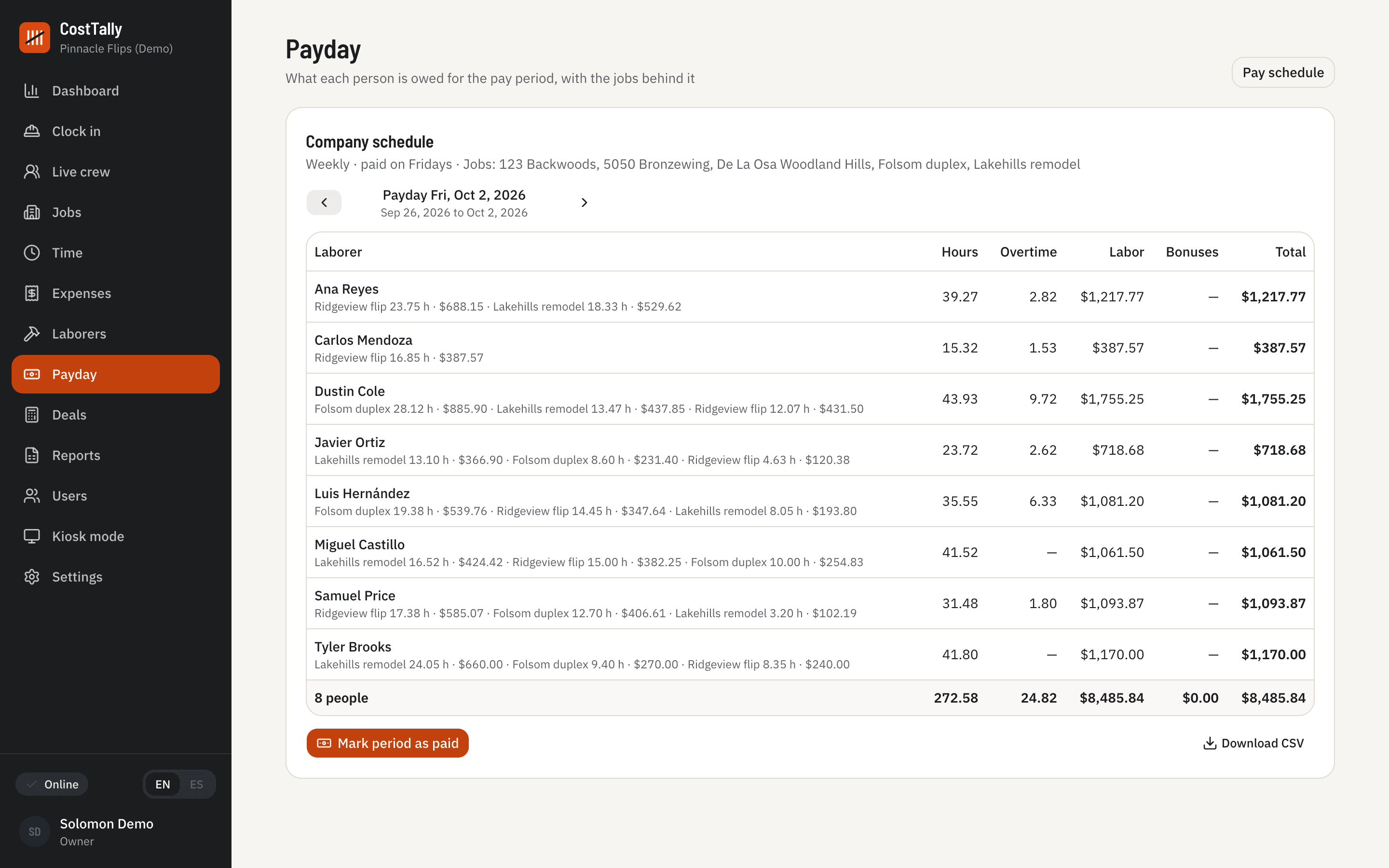
Weekly or biweekly, on the day you choose. Every worker's hours, overtime, labor and bonuses by job, and a record of each period you paid.
The evening report
One email at the end of the day: what each job cost, who worked, and what needs you. Alerts for auto-closed shifts, off-site clock-ins and receipts awaiting approval.
Friday, handled
Who gets paid, how much, and for which house
Set your pay schedule once. Each period, CostTally adds up every worker’s hours, overtime, labor and bonuses by job from the shifts the crew already clocked. Mark the period paid and the record stays. The 1099 and payroll sheets fall out of the same data at year end.
- Weekly or every two weeks, on the day you choose
- A job can pay on its own schedule
- Open shifts are called out before you pay
- Download the period as a sheet for your bookkeeper
How it works
Three steps, and the third one is reading
- 1
Create the job
Address, budget, and the categories from your company list. Set the geofence from your phone standing on the lot.
- 2
Let the day happen
The crew clocks in. Receipts get snapped in the truck. A foreman's purchase waits for your approval; yours lands approved.
- 3
Read the number
By evening every dollar is on a job and a category, with the labor, material and soft-cost split, against budget. The report is in your inbox.
Your data
It is your business. It stays your business.
Export any time
Every time entry, expense, payday period, payroll run, 1099 summary and track record downloads as a sheet, with a link to each receipt photo. Your bookkeeper gets a file, not a login.
Receipts in a private store
Photos live in private storage tied to your company, served only to people signed in to it.
Not sold, not trained on
We do not sell data and we do not train AI on your receipts or your crew. The AI reads one receipt at a time, for you.
Delete on request
Done with CostTally? Ask and the company is removed. Finished jobs stay yours to export first.
Pricing
Thirty-nine a house. That’s the whole price list.
Pro is $39 per active job per month, capped at $249 for unlimited jobs. Unlimited crew, every feature, no per-seat fees for day laborers who come and go. Planned, on-hold and finished houses are free. One active job is free forever too.
- 1 active job
- $39/mo
- 3 active jobs
- $117/mo
- 5 active jobs
- $195/mo
- 7 or more
- $249/mo, flat
Questions
Things people ask before they start
- Do I have to install anything?
- No. CostTally runs in the browser on any phone, tablet or laptop, and can be added to the home screen like an app. No app store, no updates to chase.
- What happens when the jobsite has no signal?
- Clock-ins, clock-outs and receipt photos are saved on the device and sent when signal returns, so nobody waits on a bar of coverage. A receipt taken offline is typed in by hand and its photo is attached once it uploads.
- My crew works in Spanish. Does the app?
- Every screen is available in Spanish, chosen per person, so the foreman can run the day in Spanish while the owner reads the dashboard in English.
- Can my foreman see what people are paid?
- That is your call. A single switch hides rates and labor dollars from foremen; they see hours and categories only. Owners and admins always see the money.
- What counts as an active job?
- A job marked Active. Planned jobs that have not started, jobs on hold, and completed or sold jobs are free, with all their history. Pro is priced per active job, capped at $249 a month.
- Is my data mine?
- Yes. Export every time entry any time, download payroll, 1099, payday and track-record sheets, and ask us to delete the account when you are done. We do not sell data or train AI on it.
Tonight’s report could be about today.
Create the company, add a job, hand the foreman the link. The first clock-in takes a minute. The first evening report arrives that evening.